Photometer 5010

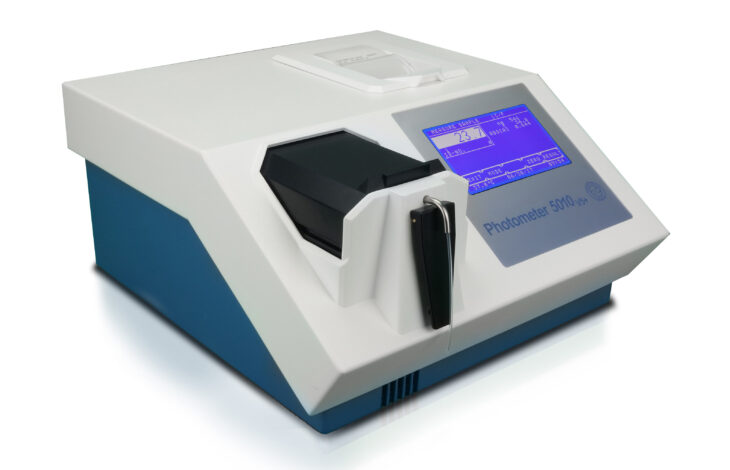
Photometer 5010

Semi-automated clinical chemistry analyzer with flow-through cell


Our highly regarded Photometer 5010 is now available in version 9.
Find out what's new in this version here:

- Biochemistry tests on whole blood, serum, plasma, or urine samples.

- Compatible reagents are validated on our devices. The respective methods can be pre-programmed in our analyzers and are therefore easily accessible.
> Go to pre-programmed reagent manufacturers list

TECHNICAL SPECIFICATIONS

Type Semi-automatic, single-beam filter photometer
Light Source LED with long lifetime
Wavelength 340 nm and 380 nm – 730 nm
Wavelength Selection Automatic via 9-position filter wheel :
6 standard interference filters (HBW ≤ 7 nm):
340 nm, 405 nm, 492 nm, 546 nm, 578 nm and 623 nm;
3 positions for optional filter of choice
Photometric Range 0 – 3.0 A
Cuvette System Micro flow cell: 32 µl, 10 mm light path interchangeable with normal standard cuvettes (macro or semi-micro, disposable or special optical glass)
Temperature Control
  • Internal Peltier element, temperature variable, programmable in 1°C steps between 25°C – 41°C
  • Equilibration time for aspirated reaction mixture to reach 37 °C from ambient temperature: 15 sec
Aspiration System Built-in peristaltic pump driven by stepper motor, programmable aspiration volume controlled by infrared light barrier
Sipping Volume
  • Minimum 250 µl, typically 500 µl up to 2000 µl
  • Separate setting of aspirate volume and wash volume
Operator Interface Touchscreen for direct functions and alphanumerical inputs
Data Presentation Graphic display: white characters or symbols, blue backlight, dimension 240 * 128 dots
Integrated Printer Thermal printer, 24 characters per line
Languages English and French / German / Indonesian / Polish / Russian / Spanish / Ukrainian
Other languages on request
Memory
  • General operating software can be updated by PC
  • Reagent open system with capacity for up to 231 programmable methods
  • Import of data by touchscreen or PC
  • Up to 50 non-linear calibration curves with max 20 sets of points can be stored
Data Logging Up to 1000 results can be saved in the memory
Signal Port
  • Serial port for connection to an external printer and/or PC
  • RS232 connector for barcode reader for an easy management of sample identities
Measurement Procedures
  • Absorbance
  • End Point with factor, standard or multiple standards, with or without reagent blank and/or sample blank
  • Bichromatic end point
  • Kinetics with standard, factor or multiple standards, with or without blank
  • Fixed time with standard, factor or multiple standards, with or without reagent blank
  • Turbidimetry
  • Single, double and triple determinations
  • Curve fitting for non-linear standard curves
  • Free hemoglobin in combination with optional interference filters
Quality control Up to 50 methods can be controlled with two control sera
Levey Jennings plot
Measuring Time
  • Kinetic: variable from 3 – 19 deltas, time per delta 4 – 255 sec in 1 sec steps
  • Fixed time: variable from 0 – 1800 sec in 1 sec steps
Delay Time Programmable from 0 – 1800 sec in 1 sec steps
Mains Supply

Input voltage: 12 VDC

  • Universal Power Supply

Range: 100 VAC up to 240 VAC at 50/60 Hz
optional:

  • Power bank
  • Solar Panel
  • Vehicle Power Supply
Dimensions Length 33 cm x width 34 cm x height 18 cm
Weight 5.0 kg
Included in Delivery 1 Instruction for use
1 Aspiration tube
2 Fuses for line power
1 Mains cable
2 Thermal printer paper
1 Pump tube with joints
1 Standard cuvette adaptor
1 Top cover small for printer
1 Waste tube
1 Dust cover

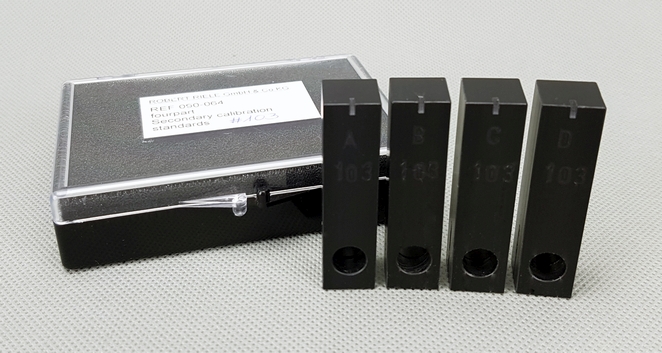
For calibration of the photometer:

REF 090-064 – Secondary Calibration Standards

Secondary Calibration Standard

Manuals for version V8 available in:

Flyer available in:

Manuals for version V7 available in:

Manuals for older versions:

V5 available in:

V6 available in:

Accessories

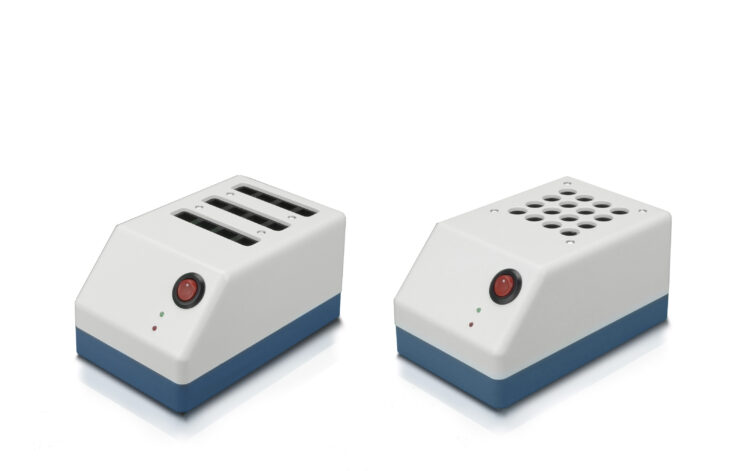
Improve your lab’s accuracy with our Incubator T12 or T16 for standard cuvettes and tubes
Incubator T12/T16

Incubator T12 / T16

Incubator T12 for 12 standard cuvettes
Incubator T16 for 16 tubes

FAQ

How is a photometer used?

In general, a photometer is used to measure the intensity of light by detecting how much light is absorbed, transmitted, or reflected by a sample. The device emits a controlled light source through a sample, and a sensor measures the light that reaches it. The photometer then converts this measurement into a numerical value, helping users analyze concentrations. Photometers are commonly used in laboratories, environmental testing, water quality analysis, and industrial applications.

A semi-automated clinical chemistry analyzer is used to quantitatively determine clinical chemistry analytes in human serum, plasma and other clinical specimen from patients of all ages and independent of gender. The chemistry analyzer is used in combination with in vitro diagnostic reagents designed for manual procedures to be used by qualified laboratory technicians. Quality control is performed with clinical chemistry standards, calibrators and controls available from the respective manufacturer of reagents.


What kind of light source does the analyzer use?

We are using LED technology.
LEDs offer consistent light intensity and wavelength, improving measurement accuracy and reproducibility.
  • Long lifetime
  • Up to 20.000 h run-time
  • Higher stability
  • Low maintenance

See our blog entry on the LED technology 

Which filters are installed?

Our analyzer has an automatic 9-position filter wheel with 6 standard interference filters (HBW ≤ 7 nm) isntalled: 340 nm, 405 nm, 492 nm, 546 nm, 578 nm and 623 nm;
However, 3 positions for optional filter can be of your choice.

What does the delivery package include?

  • Operating Instructions/Scan me QR Code
  • Aspiration tube
  • External power supply
  • Thermal printer paper
  • Pump tube with joints
  • Top cover small for printer
  • Waste tube
  • Dust cover
  • Optional: power bank

How long do you offer spare parts for my clinical chemistry analyzer?

Our motto is “All photometers shall be running – for decades and in the remotest places in the world”.

We supply spare parts and consumables for at least 7 years after purchase. Did you know that some analyzers are in the market for over 20 years at are still running?

Which clinical chemistry reagents are compatible for our analyzers?

Our devices have an open system, allowing users to utilize reagents from any brand manufacturing e.g clinical chemistry reagents.

Compatible reagents are validated on our devices. The respective methods can be pre-programmed in our analyzers and are therefore easily accessible.

> Go to pre-programmed reagent manufacturers list

What do I need to keep in mind when I turn off the device?

Find our end-of-day routine for semi-automated  clinical chemistry analyzers here: Link

The way we shut down and maintain our analyzers at the end of the day plays a critical role in ensuring accuracy, extending instrument life, and keeping workflows smooth.

For our Photometer 5010 with a flow-through cuvette, here’s a simple but essential end-of-day routine:

  • Flush the flow-through cuvette
  • Empty the tubing system
  • Release the pump tube
  • Check and clean waste container

How many methods can I program?

You can pre-program 231 methods and up to 50 non-linear calibration curves with max 20 sets of points can be stored. Your data can be imported by touchscreen or PC via RS232.

Follow our channel and find a video on “How to create a new method with Photometer 5010 and 4040”.

How do you use the volume optimized feature in the software?

The Volume Optimization feature in our clinical chemistry analyzer Photometer 5010 helps optimize sample use.

See our how-to guide on Volume Optimized is OFF vs. ON

Inside, you’ll learn:

  • What happens when Volume Optimized is OFF vs. ON
  • How the system behaves when you present the exact sample volume
  • What changes when you provide more than the required amount
  • How to make the most of this feature for smooth, reliable workflows

Do you have videos explaining some essential functions?

Yes, please follow our channel and find several videos on divers functions such as optic adjustment, how to align the touchscreen, etc.

Contact Info

WordPress Cookie Plugin by Real Cookie Banner